Practice to input a word in Kanji
We type a word or sentence in Romaji, then convert it into Kanji by using the Space key.
 |
本 |
(ほん) |
| 1. |
Type |
H O N N |
 |
ほん is displayed. It is underlined. |
| 2. |
Space key |
|
|
ほん is converted into 本. |
| 3. |
Enter key |
|
|
本 is typed in. |
|
日本語 |
(にほんご) |
| 1. |
Type |
N I H O N N G O |
|
にほんご is displayed. It is underlined. |
| 2. |
Space key |
|
|
にほんご is converted into 日本語. |
| 3. |
Enter key |
|
|
日本語 is typed in. |
|
夏休み |
(なつやすみ) |
| 1. |
Type |
N A T S U Y A S U M I |
|
なつやすみ is displayed. It is underlined. |
| 2. |
Space key |
|
|
なつやすみ is converted into 夏休み. |
| 3. |
Enter key |
|
|
夏休み is typed in. |
|
食べる |
(たべる) |
| 1. |
Type |
T A B E R U |
|
たべる is displayed. It is underlined. |
| 2. |
Space key |
|
|
たべる is converted into 食べる. |
| 3. |
Enter key |
|
|
食べる is typed in. |
|
大きい |
(おおきい) |
| 1. |
Type |
O O K I I |
|
おおきい is displayed. It is underlined. |
| 2. |
Space key |
|
|
おおきい is converted into 大きい. |
| 3. |
Enter key |
|
|
大きい is typed in. |
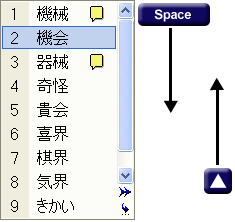
How to choose a word from the list which are the same pronunciation but different words.
Press the Space key again.
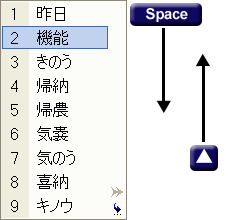
The list is displayed. The list includes all words which have the same pronunciation.
You can choose a word you want to by UP / Down key.
|
昨日/機能 |
(きのう) |
yesterday / function |
When you convert KINOU for the first time, 昨日 will be displayed.
It is because 昨日 is the first option of MS-IME as default.
IME, not only MS-IME, but also every IME such as KOTOERI of MAC, learns that which option the user choosed.
In the above case, you choosed 機能. Then 機能 will be the first option at the next time.
|
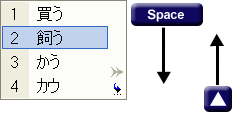
買う/飼う |
(かう) |
to buy / to keep a pet |
|
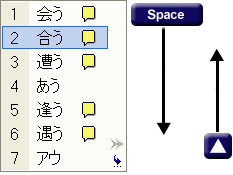
会う/合う |
(あう) |
to meet a person / to match, fit |
|
機械/機会 |
(きかい) |
machine / opportunity |
|
商品/賞品 |
(しょうひん) |
a product, goods / a prize |
| 1. |
Type |
S H O U H I N N |
|
しょうひん is displayed. It is underlined. |
| 2. |
Space key |
|
|
しょうひん is converted into 賞品. |
| |
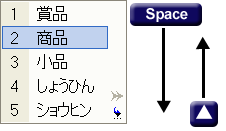
If you want to type in 商品, Press Space key again.
The list will be displayed. |
| 3. |
Space / UP key |
|
Choose 商品. |
| 4. |
Enter key |
|
|
商品 is typed in. |
|
|
How to type numbers.
There are three types of number characters.
| Sanyoo-Suuji | Hankaku (half-width character, 1 byte) | 1234567890 |
| Sanyoo-Suuji | Zenkaku (full-width character, 2 bytes) | 1234567890 |
| Kan-Suuji | Zenkaku (full-width character, 2 bytes) | 一二三四五六七八九十 |
In mordern Japanese, Sanyoo-Suuji (Hankaku or Zenkaku) is more common.
You must use Hankaku for email address, URL or Pin code.
Zenkaku causes trouble with them.
Type in numbers directly under the Japanese mode.
|
12345 |
(Hankaku) |
half-width characters |
| 1. |
Type |
1 2 3 4 5 |
|
12345 is displayed (under the Japanese mode). |
| 2. |
F10 (Function 10) |
|
12345 (Zenkaku) is converted into 12345 (Hankaku). |
| 3. |
Enter key |
|
|
12345 is typed in. |
| |
If you want to type Zenkaku, here, Press F9.
Hankaku is converted into Zenkaku.
|
| |
F9 (Function 9) |
|
12345 (Hankaku) is converted into 12345 (Zenkaku). |
| MS-IME |
KOTOERI |
|
 |
[Control] + [ ; ] |
Zenkaku to Hankaku |
12345 |
|
12345 |
 |
[Control] + [ L ] |
Hankaku to Zenkaku |
12345 |
|
12345 |
Type in numbers with Kanji such as date, floor, times, etc.
|
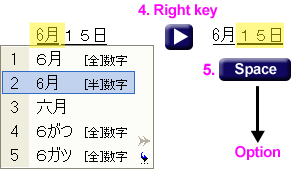
6月15日 |
(ろくがつじゅうごにち) |
June/15th. |
| 1. |
Type |
6 G A T S U 1 5 N I C H I |
|
6がつ15にち is displayed. It is underlined. |
| 2. |
Space key |
|
|
6がつ15にち is converted into 6月15日 (Zenkaku). |
| |
If you want to type in 6月15日 (Hankaku), Press Space key again.
The options will be displayed of 6月. |
| |
MS-IME converts each phrases in a word.
In this case, 6月 is the first phrase. 15日 is the second phrase. |
|
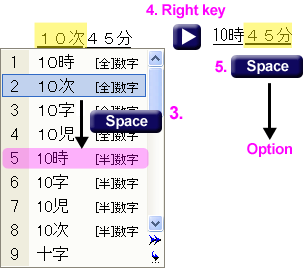
10時45分 |
(じゅうじよんじゅごふん) |
10:45 |
| 1. |
Type |
10 J I 4 5 F U N N |
|
10じ45ふん is displayed. It is underlined. |
| 2. |
Space key |
|
|
10じ45ふん is converted into 10時45分 (Zenkaku). |
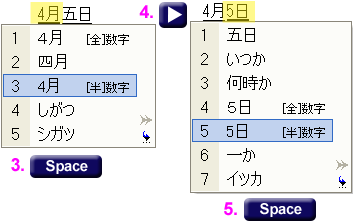
In order to type the 1st. to 10th. of month, you should type its reading.
|
4月5日 |
(しがつ いつか) |
June/15th. |
| 1. |
Type |
4 G A T S U I T S U K A |
|
4がついつか is displayed. It is underlined. |
| 2. |
Space key |
|
|
4がついつか is converted into 4月5日/4月五日. |
| |
If you want to type in 4月5日 (Hankaku), Press Space key again.
The options will be displayed for 4月. |
 |
Choose the target phrase to convert |
 |
Choose the target phrase to convert |
| [全]数字 |
Zenkaku numbers 12345 |
| [半]数字 |
Hankaku numbers 12345 |