


There are three types of character for numbers and two type of the alphabet character.
| Hankaku (half-width) | 1234567890 |
| Hankaku (half-width) | ABCDEFG, abcdefg |
| Zenkaku (full-width) | ABCDEFG, abcdefg |
| Zenkaku (full-width) | 1234567890 |
| Zenkaku (full-width) | 一二三四五六七八九十 |
You must use Hankaku (half-width) characters for email address, URL or Pin code.
Zenkaku (full-width) characters cause trouble with them.
You should use Hankaku (half-width) chracters for numbers and alphabet in general.
When you input some alphabet letters in a sentence, you don't have to change your typing mode from Japansese to English.
 |
娘の名前はChristinaです。 | (むすめのなまえは Christina です。) |
| む | す | め | の | な | ま | え | は | Christina | で | す | 。 |
| MU | SU | ME | NO | NA | MA | E | HA | Christina | DE | SU | . |
| 1. | Type | M U S U M E N O N A M A E H A |  |
むすめのなまえは is displayed. |
| 2. | Space key | |
むすめのなまえは is converted into 娘の名前は. | |
| 3. | Type | C H R I S T I N A | |
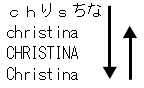
chりsちな is displayed. |
| 4. | F10 | |
chりsちな is converted into christina. | |
| 5. | F10 again | |
christina is converted into CHRISTINA. | |
| 6. | F10 again | |
CHRISTINA is converted into Christina. | |
| 7. | Type | D E S U . | |
です。 is displayed. |
| 8. | Enter key | |
娘の名前はChristinaです。 is typed in. | |
 |  |
Put a space between the words.
You can put a space by [Ctrl] + [Space] under the Japanese mode.
|
私は_iPodを買いました。 | (わたしは_iPodを かいました。) |
| わ | た | し | は | i | P | o | d | を | か | い | ま | し | た | 。 | |
| WA | TA | SHI | HA | i | P | o | d | WO | KA | I | MA | SHI | TA | . |
| 1. | Type | WATASHIHA | |
わたしは is displayed. |
| 2. | Space key | |
わたしは is converted into 私は. | |
| 3. | [Ctrl] + [Space] | |
Put a space "_" | |
| 4. | Type | i P o d | |
_いPod is displayed. |
| 5. | F10 | |
_いPod is converted into _iPod. | |
| 6. | Type | W O K A I M A S H I T A . | |
をかいました。 is displayed. |
| 7. | Space key | |
をかいました。 is converted into を買いました。. | |
| 8. | Enter key | |
私は_iPodを買いました。 is typed in. | |


