Learn Japanese
How to Type in Japanese


You can input Japanese characters with non-Japanese software such as English email software or English Office softwares.
Japanese keyboard is NOT necessary.
You can type in Japanese language in Hiragana, Katakana, Kanji using a keyboard of English or other languages.
For Windows User
You need MS-IME to input Japanese language.
MS-IME is Japanese input software and it is standard accessory for Windows XP, Windows VISTA and Windows 7.
Japanese people, too, use this software to type in Japanese on Windows.
MS-IME is ready on the hard disk or on the System disk on non-Japanese Windows such as XP, VISTA or Windows 7 English version.
You need Japanese Fonts in your system before you start to install MS-IME.
For MAC User
Japanese input software, KOTOERI is provided on MAC OS.
Preparations for KOTOERI

Preparations for Windows
If you manually install Japanese fonts and complete setting "non-Unicode Programs",
MS-IME will also be automatically installed.
If you see "EN" (in case of Windows English version) on the taskbar like on the right,
It is the Language Bar. MS-IME is already installed.
You do not need to go through Step 1.
Step 1 - Installing MS-IME
Step 2 - How to Start Typing Japanese Mode
Windows XP
Windows VISTA
Windows 7
Step 3 - How to Finish Typing Japanese Mode or Remove MS-IME
Windows XP
Windows VISTA
Windows 7
Option - Setting "non-Unicode Programs"
If you cannot view Japanese characters properly
even after installing Japanese fonts, please try this option.
Windows XP
Windows VISTA
Windows 7

Practice Level 1 - Type Japanese in Hiragana and Katakana
We introduce how to type in Japanese by using MS-IME,
but it is basically the same way by KOTOERI of MAC.
How to type Japanese character is based on Hiragana Katakana table.
Please check it first.
Type Japanese words in Hiragana
Type Japanese words in Katakana
How to correct a typo after converting, before Enter
Type Hiragana Katakana Long Vowels
Type Hiragana Katakana Double consonants
Type "KYA, KYU, KYO", "SHA, SHU, SHO"
Type Katakana New methods, "FA", "FI", "TI", etc.
Type short sentence in Hiragana and Katakana - Particles "WA" and "O"
Overview
How do Japanese people type Japanese?
What is IME?, What does IME do?
(Japanese keyboard is not necessary)
There are two typing methods, Romaji typing and Kana typing.
Currently, Romaji typing is more common than Kana typing among Japanese people.
Because ...
How do you input ?
You can input Japanese symbols by IME under the Japanese typing mode.

Practice Level 2 - Type Japanese in Kanji
Lesson 8
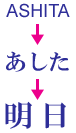
Convert Hiragana into Kanji
Choose a word you want to type from options
Type numbers with Kanji such as date or time.
Type and convert word by word
Type and convert sentence at once
How to correct a typO after converting, before Enter
Type the alphabet under the Japanese mode.
Expand or shorten a phrase to convert

MS-IME (Windows)


KOTOERI (MAC)
Copyright (C) 2010CosCom Language Service, Inc.All Rights Reserved.

Contact